You are coding away. A minute goes by… You check the watch, and its been two hours!
You don’t know how those two hours went by, but they were very productive. You feel good. Happy. A joy that comes of active creation.
You, my friend, were in the flow. It’s a state that is a reward in itself, a state with your highest of performance.
Given that, can we try to create conditions to get into that state as frequently as possible? What works for you? How often do you find yourself in the flow?
I find myself at my productive best when I can get at least two sessions of complete concentration in a day. These sessions don’t include checking email, or Facebook, or having design discussions or reviewing other’s work. They include working by myself, typically on a programming assignment. And often it happens when the stuff is churning in my mind for quite some time. So once I sit down, all those thoughts just spill over through the keyboard onto emacs.
While many are worth mentioning here, the following 4, I believe, are some of the must reads:
The Lean Startup
The way Eric Ries highlights the pain he felt on spending time and energy working on things that their team thought was valuable to their customers, and the solutions he proposes to shorten that path are very easy to relate to. The concept of avoiding wastage by being very close to your customer (starting with a paying customer) rather than being boxed by sitting on your desk is well put forth.
He also makes a case for not only applying the principle initially, before your get to product-market fit, but throughout your engineering cycle as your product matures. It is the development of an experimental attitude rather than a list of bullet points.
“If you are not embarrassed by the first version of your product, you’ve launched too late.” — Reid Hoffman
Release early, get feedback, improve and iterate.
Word of caution: Make sure you balance the vision v/s customer-feedback.
“If I had asked people what they wanted, they would have said faster horses.” — Henry Ford (or maybe not)
The Innovator’s Dilemma
While The Lean Startup talks about avoiding wastage by listening to your customers, this books lists how listening to your customers makes companies miss out on the technological shifts that disrupt the landscape. It is a great book that highlights the advantages of being small and new over big and established. And captures quite a few studies about how established incumbents were displaced with these technological shifts. It is a great book for all startup founders as well as employees looking for new ideas with tiny markets.
My few key takeaways:
Disruptive technologies are often characterized by poorer performance for the mainstream attributes. But they are attractive to a tiny set of customers. Thus they open new markets with different value proposition.
Large companies don’t want small markets. And their mainstream customers aren’t interested in the new value proposition. So they don’t invest in disruptive technologies.
With high pace of technological progress, disruptive technologies soon surpass established (sustaining) technologies and are appealing even to mainstream customers.
Mainstream customers, now, as if all of a sudden, wish to move to the newer disruptive technology that the large company has been ignoring.
And finally, even if the large company invested in disruptive technology, it might do so with a sustaining technology mindset, thus setting up for failure from the get go.
The Hard Thing about Hard Things
Ben Horowitz writes about their journey through Opsware in this book. This is a must read by any founder or startup employees.
They came quite close to the brink a few times as they were going through this experience. It emphasizes how any startup requires improvisation. Particularly, even when they had Ben and Marc (with Netscape success already behind them) as a core part of the process.
For employees who come from non-startup backgrounds, they find the uncertainty, the experimentation, the improvisation too unnerving. And a pivot is really the end of the world for them. These guys don’t know what they are doing they end up thinking. And that helps nobody. All potential startup employees must read this book. Startups aren’t just about getting from 0 to 100, but it is about venturing into the uncharted, defuzzing the uncertainty is the adventure.
Great Management Reference: This also happens to be a great reference book for all things people management. Right from dealing with your best employee who starts feeling entitled, to team culture and accountability and creativity. Always a great book to have close at hand and refer to, in time of crisis or otherwise.
Venture Deals
This is my final recommendation for all startup founders, particularly first-time founders.
It captures details about founder agreements, equity funding process, raising money, term-sheets, fine prints. It even includes samples/templates for the most standard terms that are present in most of these VC documents.
It is a great read for anyone trying to understand how the internals for startup financing work.
Recently
I attended the project exhibition at my Alma-mater. I was excited to
sit through the presentation of a project group. The oh-so-familiar logo
splashed on their opening slide:
Like the flashbacks in Bollywood movies, it all flashed in front of my eyes. Thirteen years! Its been thirteen years since the Dreamz Group
has been guiding these capstone/final year engineering projects. Doing
something consistently and with high quality for that long is certainly
something.
It
all began in 2003, when a group of us friends thought we should do
something to build better engineers coming out of colleges. The decision
was to focus on these final year projects, be good mentors to the
students. And then identify challenging problems to solve, work on their
solutions, and do so by following best practices from the industry.
The initiative was very successful. Our projects won prizes at prestigious institutes, presented papers at conferences like OLS, but importantly I believe it was an awesome learning experience for everyone involved, the mentor and the mentee.
We
never intended for it to run this long, so we certainly must have done
something right, probably accidentally, along the way. And I have been
thinking what made it work, here are the top few. Most of these seem
basic common sense, but hey, that’s what made it.
The “Why”?
We
did a good job of internalizing why exactly are we doing this. It
provided us a great anchor to base our decisions and take on new
initiatives. Every year, any session we did with students, we reiterated
publicly why we are doing this. We threw the doors open for anybody
looking for help to reach out to us. I think these repeated public
declarations, helped everyone internalize it. Probably like a pledge but
with more earnestness and meaning.
A
case in point is how we viewed other project guiding groups that came
up over the years. We always aimed to get along well with all these. In
fact, for students that had gone through our screening process, we also
shared our true feedback about them and made referrals at other places
for guiding projects. There is no rivalry in teaching, its a good deed.
Involvement
After
a couple of years of the activity, we thought: why should learning (or
involvement) stop when the students finish off their projects? What else
could you do? Since then the senior students were deeply involved with
our screening process, running many rounds all by themselves. Some
interested folks also acted as co-mentors for the next batches of
students. Regular sync-ups ensured that the same values and ethos
carries forward through the process.
In
all of this, I think everyone developed a sense of ownership, and a
community around this work. We made many changes in our processes and
approaches, and almost every one of them came through by suggestions
from the newlyinvolved folks. We automatically kept up with the times, because a younger batch kept guiding us :).
Along
the way, the baton of organizing and mentoring these projects has gone
from multiple generations of students. My hearty thanks to all those who
have been involved.
Mutual Respect
I learned many things through this activity, but the biggest take away, no doubt, was people.
While
I was at this project exhibition (that I mention at the top), I met
many folks who I had the privilege of mentoring. Folks, across multiple
batches, few of the best students in the best educational institute, and
who have gone on and made a difference.
I
don’t meet most for years, but when we do meet, the mutual affection
and respect gushes forth like a reborn stream at the sight of first
rains. It is these bonds, these relationships that make it so
worthwhile.
Times
change, technologies change, and this initiative will continue to adapt
and finally stop at some point. Till then, here’s to hoping more such
fun experiences!
This is the second part of Building secure connected devices. The first is available here.
In
the first part we looked at the typical attack vectors for remotely
accessing connected Wi-Fi devices in the smart home. These attacks could
let an attacker control any device half way across the globe. In this
part, we will consider the common attack vectors for the (a) local
network access and (b) physical access of connected devices.
Local Network Access
Most
connected devices offer a local network API for smartphones/laptops to
use. The smartphone can query and configure the connected device using
these APIs. This allows super fast exchange of information without
having to go through the cloud.
Typically,
for most homes, the Wi-Fi Access Point enforces a MAC-level security
like WPA/WPA-2. This ensures that a phone/laptop cannot get on the Wi-Fi
network or read/write packets unless it has a correct secret,
passphrase / key, for the network. Since this secret is handed over by
the home owner to other persons, it is assumed that anyone getting
access to the Wi-Fi network is a trusted person.
This
level of security works for most products. It relies on the the Access
Point to identify authorized accesses, thus exposing these APIs to
anybody as long as they are on the local network.
Additional Cryptography Layer
Some IoT products/ecosystems, like Apple HomeKit,
go one step further and implement an additional cryptography layer on
top. With this method, the APIs exposed on the local Wi-Fi network are
also secure. A client smartphone/tablet requires an additional device
secret for it to interact with the device, even though it is on the
local Wi-Fi network.
Once
this cryptography layer is established, a role based access control
could also be implemented. With this you could define what the kids in
the house can control as opposed to you or your wife.
Connected
devices that implement this should note that it does affect the user
experience, particularly for novice users with multiple devices,
multiple clients and their differing roles. Care should be taken to
expose it intuitively such that it doesn’t become too complex for users
to not use it, or misuse it.
Reset Network Settings
The
above mechanisms protect the device as long as it is connected to the
home Wi-Fi network. Given the above, an attacker might try to force the
device to forget its network configuration settings. If the connected
device forgets the configuration of the home network, it will typically
enter into a configuration mode where it lets a user configure the home network (we will discuss this soon in the next subsection).
Hence,
care should be taken to ensure that any action that makes the device
forget the home network settings is a deliberate action taken by an
authorized user.
New Device Setup
When
an end-user brings a smart device home, say a connected light bulb, the
first thing that the user has to do is configure it so it can connect
to the home Wi-Fi network. Since most of the ‘things’ in IoT are
headless, this implies that the user cannot simply enter the network
name and its passphrase into the device using the device’s keyboard or
touch-screen.
Network Provisioning
There
is a wide variance in the methods for performing this network
provisioning step for IoT. This uses some communication mechanism
between the user and the smart device to securely transfer the home
Wi-Fi network’s credentials. There are many communication mechanisms for
this transfer, using NFC, IR, light among others.
The thing to remember in new device setup is to always authenticate the other endpoint
The
most common mechanism, that I have seen, is where the smart device
hosts its own temporary wireless network. A user’s smartphone can then
connect to this temporary wireless network, and then transmit the
information over this network.
Malicious User
Fake Device
Given
the above, can a malicious user configure the smart device to connect
to a malicious Wi-Fi network? Or can a neighbor configure my
grandfather’s thermostat to connect to her Wi-Fi network?
OR
Can
a fake device be created to deceive the real owner to configure the
fake device to their home network? Can my grandfather accidentally
configure my neighbor’s fake thermostat to connect to his Wi-Fi network.
In the process revealing his Wi-Fi network credentials to the neighbor?
The thing to remember in implementing new device setup is to always authenticate the other end point.
The
smart device, being configured, should only let the real owner of the
device configure it. This can be done by using some kind of proof of
possession, like a secret on the box, or press of a button, or a state
of the device. This allows the user to prove that she really owns the
device that she is configuring.
On
the other hand, the app (smartphone/laptop) that configures the smart
device should ensure that it is talking to a genuine smart device that
is owned by the user, and not a fake one. This can be done by using some
kind of PKI or a challenge-response mechanism.
Physical Access
The
final way of interacting with the device is physically accessing it,
the old non-IoT way. Physical access is often used for establishing
proof of possession and ownership for the local and remote accesses.
Now
let’s look at attack vectors where an attacker tampers with a connected
device, and then gives the device to the unsuspecting end-user. The
goal of the tampering is to eventually either snoop data from the
connected device, or write data/commands to the connected device, or
perform a DOS.
From
an attack point of view, this requires physical presence around the
device, it isn’t possible to execute this kind of an attack remotely.
Either the attacker’s presence in the home, or his access to the device
before it is brought in the home, is required for such an attack. The
effort required for such an attack may probably justify a relatively
high-profile target, but as IoT penetrates deeper into our surroundings
and becomes a norm, this isn’t unthinkable.
Basics
If
any embedded developer is asked to hack open a device, the first thing
he would do is try to get access to the device console or the debugger
interface (JTAG/SWD). These should definitely be disabled in production.
Also
to note is that any data or firmware on the device flash can be read or
modified by removing the flash parts. Security researches frequently do
that for analysis [pdf]. Hence, any sensitive data stored on the flash should be encrypted.
Trusted Boot
If
data can be written to flash, an attacker could modify the firmware
that is stored on the flash. An attacker could, for example, simply
change the server URL and server certificates in-place to those of a
malicious server. With such a change the connected device may start
reporting data and accept commands from a malicious server without the
user ever realizing it.
Many
micro-controllers, and most processors, offer trusted boot execution.
With such a mechanism, only the firmware that is encrypted and signed
with a valid set of keys is executed on the device. The keys are private
to the device maker. With trusted boot, if the firmware is maliciously
modified as described above, the processor will simply not load the
firmware, thus thwarting the attack.
Device Phishing
All
these precautions could be taken, but what if someone builds a clone of
your device, with exactly the same look and feel, but with an
altogether different firmware.
For
most home devices, the first use of the device starts with phone
applications. The phone applications should validate the genuineness of
the device. The PKI mechanisms that are used for validating that the
remote servers are genuine can also be used for validating that the
device is original.
Firmware Upgrades
A
big advantage of connected devices, over standalone devices, is they
can be automatically upgraded to provide newer features. From a security
standpoint, as newer attack vectors or vulnerabilities are detected,
this allows the manufacturer to fix the issues in the field and provide
customers with a more robust product. As Wi-Fi connected devices can
directly talk to a remote server, they can periodically look for these
upgrades, and automatically download and install these upgrades
themselves.
Interestingly,
the firmware upgrade mechanism can also be misused to deploy malicious
firmware across all your products deployed in the field.
Signed and Sealed
As with the remote access
scenario, do ensure that the servers, that the firmware upgrade will be
fetched from, are authenticated with TLS (certificates).
As
an additional layer of security, also sign and encrypt your upgrade
images. Using different keys for different product lines should also be
helpful. This additional layer of security ensures that even if the
cloud services are compromised for some reason, the connected devices
reject the firmware images that may be tampered with.
That
concludes this two part series about Building Secure Connected Devices.
If you are building a Wi-Fi enabled devices, these articles hopefully
serves as a good reference to influence your product implementation.
Note: Thanks to freeimages for the image of the envelope/seal and pixabay for the image of the lockers.
(Originally published here, please excuse misalignments, if any)
Recently I was researching for articles on Security and IoT,
and I happened to notice that most of these focus more on
fear-mongering, explaining in detail how a certain device, if hacked,
could cause devastating problems. And then many articles advertise the
use of certain security solution on the cloud or likewise. But very few
attempt to explain the security context, at the IoT device level. So
here is an attempt to break-down the problem and understand the most
common security issues that could surface and the typical solutions for
the same. Hopefully this helps you to develop more secure IoT products
by design.
Why is IoT security a concern?
Connected
devices are here to stay and they are entering our lives in ways like
never before. These are no longer limited to the smart home electronic
appliances. Today we have smart door locks and smart vacuum cleaners and even the US president wearing a fitness tracker. Security is a concern primarily because of the following:
Connecting
more physical things potentially increases the surface area of the
attack vector. While previously the attack could be limited to your
email account, or social network account, the attack could now come to
your house.
Newer interactions with these connected devices opens up completely new attack vectors.
Strong
constraints on cost and power of connected devices required a newer
breed of hardware to address a lot of the IoT use cases. While embedded
devices have been around for a long time, connecting them to the
Internet opens them up to a range of attacks that weren’t possible on
these devices before. It took a while for the hardware to catch up with
the latest security standards for already identified attack vectors.
As
with the rapid increase in cloud/web-service developers, it takes time
for newer set of enthusiasts, hobbyists and developers to get acquainted
with the attack vectors and their solutions.
Device Interactions
Let
us first try to look at the typical interactions that any such smart
device will have with the outside world. Once all the interactions are
known, we can identify potential attack vectors associated with each of
these interactions and then come up with meaningful solutions to address
these.
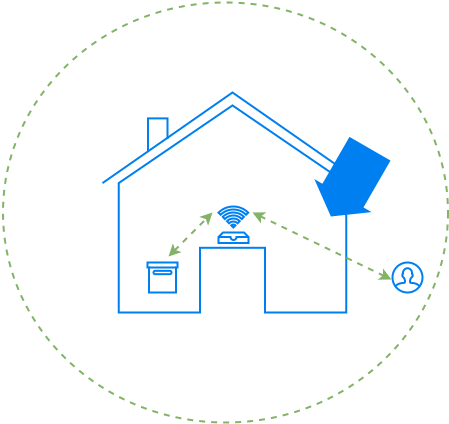
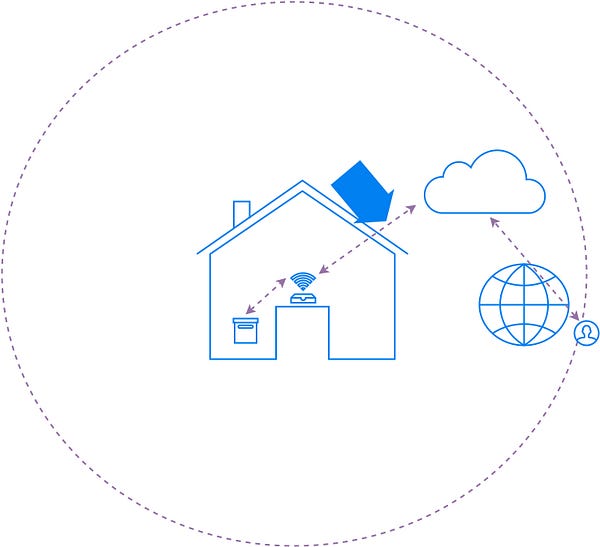
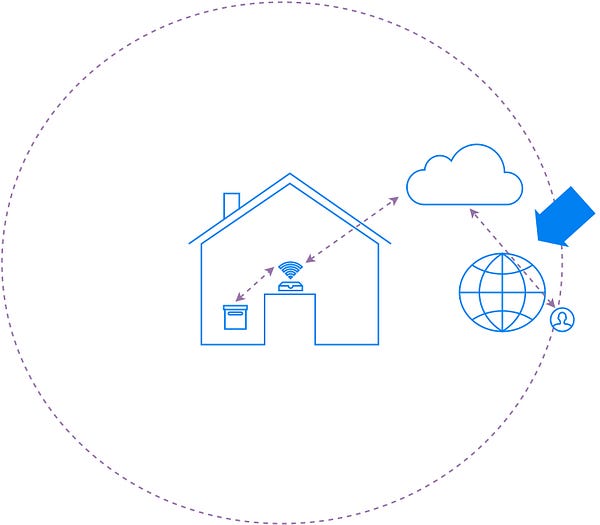
There are a wide variety of smart devices that are being built out there. Let’s look at Wi-Fi enabled devices that are typically deployed in smart homes. Consider this smart device (one the left) part of a smart home.
Most interactions with this device can be categorized into three types:
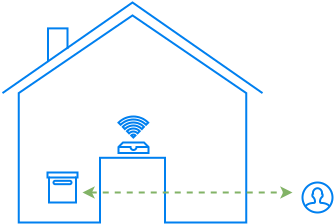
Physical Access:
The first is the physical interactions that the device owner has with
her devices. For this interaction you have to be present in the house
for operating the device.
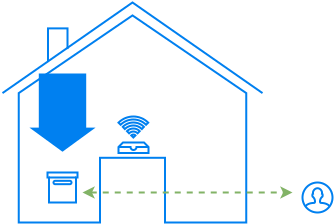
Local Network Access:
The second is the access over the local Wi-Fi network. For this
interaction you can be anywhere in the vicinity of the house in the
Wi-Fi Access Points range.
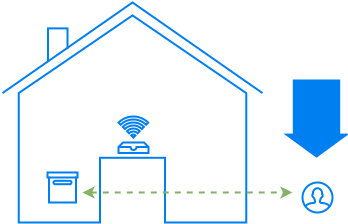
Remote Access:
Finally, most Wi-Fi devices talk to some cloud services. It may be to
facilitate remote access to the owner of the device, or to query other
services (weather, electrical pricing etc.).
Most
attackers would prefer to exploit the remote access model. This allows
them to exploit millions of devices across the world without leaving
your chair. So let’s look at that interaction first.
Remote Access
As
a common pattern of remote access, most connected devices are currently
assuming a network client persona, and communicating with a remote
server over HTTP, MQTT or other such protocol. By not being a server
themselves, for the remote access scenario, these devices avoid having
to re-configure firewalls on home gateways to open up holes for the
incoming accesses.
From the device to the cloud
Let’s
look at the first part of the device interaction from the AP onward to
the cloud (see figure below). There are multiple attacks possible
targeting this communication, like,
man-in-the-middle: snoop your thermostat data from your device to the cloud (Nest), or modify settings from the cloud to the device
replay attacks: if the data is encrypted, replay the same encrypted packet of data that unlocks the door lock of the house
DNS spoofing: divert the traffic of your connected toy to a malicious server
device
spoofing: create a malicious/fake camera, and make the cloud believe
that the camera belongs to you, the owner, and that the video feed is
genuine
But
if you notice, most of these attacks are also applicable to an online
banking transaction. The communication pattern is no different.
Obviously, the right thing to do is to rely on the tried and tested
standards that are used to protect our online banking transactions. This
mechanism is Transport Layer Security (TLS). TLS works at the transport layer, so you can run any higher level protocol, HTTP, MQTT or others, on top of it.
Until
recently, running a TLS stack on micro-controllers wasn’t a
possibility, because of their low compute power and constrained memory.
The latest IoT micro-controller platforms, however, are powerful enough to run the TLS stack. Many lowfootprintTLS
software implementations are also available that can run on these
hardware platforms. The hardware and software capability being now
available, there is no reason not to use TLS for this communication over
any other home-grown security mechanism.
From the cloud to the app
Now
let’s look at the communication from the cloud to the user’s app. This
isn’t directly related IoT per-se, but mostly about following standard
practices for secure web API design. These are the APIs that allow your
smartphones or other devices, to interact with the cloud for querying or
controlling the connected devices in your home.
The entire web API should be exposed over TLS. Additionally, you have to ensure that the user apps are appropriately authenticated with the cloud service, and then they have the proper authorization to access the thing that they are supposed to talk to. Thankfully, there are many IoTcloudplatforms available that provide a higher-level abstraction that already takes care of most of these things.
Through the secure communication channel
The
most common manner in which we get malware installed on our computers
is by accessing sites/files that we aren’t supposed to access.
Connected
devices must communicate with a limited set of known servers. And these
servers should be under the control of trusted parties.
The
other protection that helps is to have a read-only partition that runs
the firmware image. Even if you have to make any changes, it should be
first switch to a read-write mode, and then written to.
While
the above is a short list of the most common attack vectors, there
could be use case specific attack vectors based on interactions with
other elements. These should be also considered and tackled. For
example, say a door lock is unlocked if the phone reaches a certain
location, can the phone be tricked using GPS spoofing?
Those
are some of the common attack vectors and their solutions for the
remote access scenario. In the next part, we will look at possible
attack vectors for local network access and physical access.
Note: Thanks to Pixabay for the shield image in the title
This is the second part of the Bitcoin Series. If you haven't already, please refer to Part I.
In the previous part we looked at how ownership and transfer of ownership is implemented in Bitcoin. We left off with the question, how do you ensure that Mark only spends Bitcoin X only once? What is to
stop him from sending the same Bitcoin X to multiple people?
When you own an account at a bank, the bank ensures that you can only spend money that you own. The bank in this case acts as the central entity that enforces the correct set of rules on your bank account.
The Blockchain
In Bitcoin, the entire process is decentralized. The bitcoin network is a peer-to-peer network of multiple nodes running the Bitcoin client. All these nodes, in conjunction, maintain and validate a distributed ledger, called the blockchain, to enforce the rules. This is a central part of the innovation behind bitcoins.
The blockchain is a chain of blocks.
Each block contains a list of transactions.
As new bitcoin transactions are generated, they are captured together into a new block and the new block is added to the blockchain.
As can be seen above, each block contains a link to the previous block's hash, thus linking the blocks in the chain. The blockchain, thus, records all the Bitcoin transactions, right from the birth of Bitcoin. This way all the nodes in the bitcoin network know when Mark has spent the bitcoins that he owns, thus invalidating any subsequent double-spend transactions by Mark.
Proof of Work
Now the question is, since any node in the network can add blocks to the chain, how do you prove that someone malicious did not add an incorrect block to the chain? Or worse, fork the blockchain and create their own set of blocks thus misguiding everyone.
This is ensured by enforcing the following simple rules:
adding any block to the blockchain takes a significant amount of processing (CPU) power (proof-of-work). While at the same time, validating any block in the blockchain is extremely trivial.
if the blockchain is forked, all the nodes in the Bitcoin network pick the longer branch of the blockchain, ignoring the smaller branch.
Assuming that majority of the processing power in the Bitcoin network is controlled by 'good' nodes, this makes it extremely hard for malicious nodes to fork the blockchain. This is because the total processing power of the good nodes, will keep extending the blockchain further, while malicious nodes fail in their race to fork the blockchain since the forked branch will always be shorter. [1]
The process of adding new blocks to the blockchain is called bitcoin mining.
Bitcoin Mining
So all bitcoin miners are always in a race to find the appropriate proof-of-work with other miners in the network. This involves significant computer power. What is the incentive for these miners to expend this computing power?
The miner who added a new valid block to the blockchain gets a reward of new bitcoins. This not only acts as an incentive for miners, but also ensures a steady and predictable supply of new bitcoins in the system. [2]
Isn't all of this fascinating?
Additional Notes:
1.The proof-of-work algorithm makes the bitcoin miners
choose a value for a set of fields in the new blocks header, such that
the hash of the generated block satisfies a difficulty target. This
criteria is that the hash of the block should be less than a defined target value. This
makes the bitcoin miners try all the possible values in the
proof-of-work fields and check the hash of the block to match with the
current difficulty target, thus expending processing power. The
verification process is trivial because all it does is computes the hash
of the newly added block with the difficulty target.
The difficulty target of the bitcoin network keeps incrementing to keep up with the advances in hardware of the miners. The difficulty target is so adjusted that it takes an average of 10 minutes to mine a new block.
2. The current reward is of 25 bitcoins. The reward halves after every 210,000 blocks that are mined.
Acknowledgements: Thanks to Danny Hamilton for his corrections.
For the past few weeks I have been reading up and studying the technology behind Bitcoin. I have found this exploratory activity to be truly exciting, and I have often admired the application of technology to solve this problem.
Here is my take at simplifying the technology behind the working of bitcoin:
Bitcoin is
electronic currency: it does not rely on electronic tokens rather than physical tokens to represent money
decentralized (peer-to-peer): there is no central authority (like a central bank etc.) responsible for creating the currency, or responsible for managing transactions of this currency
Let's begin by assuming that there is such a currency in an electronic form, then look at the various problems that such a currency would pose.
Ownership
Since the currency is electronic, how do I prove ownership? Anybody could make a copy of my currency and claim that it is theirs.
If your mind is thinking about PKI, you are in the right direction. Digital signatures have been used for a long time now, to ensure the authenticity of the source of a message. The same principle is used for signing transactions. Since I am the only one who has the private key, I am the only one who can sign the transaction. That proves ownership.
In the example above, Mark owns bitcoin X. When he performs a transaction, his transaction will be treated as valid, since he can generated a valid signature. Larry cannot spend Bitcoin X, since he cannot generate a valid signature for bitcoin X.
You may be wondering how exactly would you know what public key should be used to validate the signature. Hold on to that thought, we will come to it in a minute.
Transfer of Ownership
Ok, now how do I transfer that ownership to someone else? What signifies ownership in this case?
I know the answer is forming in your head :).
Since we are using digital signatures, my signed transaction should include the 'public key' of the recipient. Thus the public key of the current owner will be encoded in the bitcoin transaction.
In the example above, Mark transfers Bitcoin X to Larry. He does so by including Larry's public key in the transaction.
So what does this mean for Larry, when he is spending Bitcoin X? He should sign the transaction with a private key that corresponds to the Public key that was encoded in the previous transaction. Only that will allow him to unlock/transfer the Bitcoin to the next recipient. This is shown below.
In this transaction, Larry transfers Bitcoin X to Elon. Larry's signature can be verified by anyone, since it is already encoded in Bitcoin X's previous transaction. After this transaction, Elon now owns the Bitcoin X.
So far so good, but the biggest question is, how do you ensure that Mark only spends Bitcoin X only once? What is to stop him from sending the same Bitcoin X to multiple people? This is where the distributed ledger concept of Bitcoin kicks in. It is a central part of the bitcoin innovation. More on that in a follow-on blog post.
Programming and debugging are activities where we should think a lot and do little. Commonly what happens is the reverse. We are driven by the urge to do something.
It's particularly true for debugging. We see a problem, the first instinct is to print something, build and rerun. And then print some more. In the end whenwe discover the problem we go:Ah, thatwasobvious. I could have gotten there faster instead of these x iterations. And on complex systems these iterations take a long long time.
It often helps to resist the urge to do and think what could be going off here. It saves a ton of time.
So also for programming.
A lot of programming time is spent in the edit build debug cycle. We make numerous iterations through this cycle to get to our goal. How could we optimize this? What if we are allowed only 1 iteration through this?
To ensure that I put enough thought in the process, recently I created this game for myself. After breaking the problem into subproblems I take it as a challenge that every submodule that is built will run completely in the first iteration itself. I get to decide the size of the submodule, but my code should do exactly what I intended in the first shot. Over time I have found that this leads to a lot of efficiency by forcing me to think of all the dependencies and side effects upfront.
Of course not all problems can be addressed with this method. Especially if it's a new technology or domain you learn much faster through each iteration. But for a lot of cases this approach does magic. You should try it out...
(Note: Although I mention BE Project below, this applies to any project that you are working on during your student days. )
Answer some questions for me: 1. What programming language are you strongest in?
C, C++, Java?
2. How complex a program have you written in this language? Any programming beyond the assignments? Programming is what you are going to be doing for a long time in your career. How have you really prepared yourself for this? Scoring well in theory exams is in no way an indicator of how well you can program.
Lets take cricket to emphasize the point further:
a. People who score excellent in cricket theory exams cannot become cricketers. They will tremble and sweat standing on a pitch when facing a fast bowler. A situation not unlike many I have seen in IT companies.
b. Excellent cricketers have spent a long time practicing on the pitch. You are automatically comfortable, you know you are on your home pitch. You may be nervous, but clueless you are not.
Of course, I don't mean theory is not important. It is crucial. But so is programming, and unfortunately our examination systems, do not quite test you well on that. Thankfully, within the first 10 minutes, a good interviewer can identify a kaun-kitne-paani-main-hain... (This gets quite close to the point I am trying to make).
3. Do you think after 4 years of your BE, you are a mature technical professional who is hireable?
Towards the end of my third year, I always thought we have hardly done anything significant during Engineering. I mean anyone reading a few books can get here. What makes me different?
Here are some of the important benefits of a great Project:
1. Choose your co-workers, choose your work
This is something which is closer to the hearts of the students and so lets look at that first.
Rarely in life do you get a chance to choose your co-workers. This is a golden opportunity to work alongside your friends on something constructive. Many of my students often remember and miss their days of the project when they were designing for their project, brainstorming an idea or hunting for a bug for days at end.
The culmination of all these gives you a high, a sense of achievement, like nothing else. Its that feeling of accomplishment that stays with you.
Not only your co-workers, but this is also your opportunity to choose your domain of work, or pick an idea that you are passionate about. Many people that I know end up working in more or less the same domain that they did their BE project in, , even after years of passing out of BE.
2. Preparing for the future
Here are a few things that you'll be doing once you join any organisation
a. get familiar with the tools
- revision control system
- bug tracking system
- development environment
- netiquette
b. get familiar with the code
- understand the existing architecture, code base
- debug and fix bugs
- design, implement and test a component
And this is going to be your profession. Surprisingly, as a student you have never had to do any of the above during your engineering. The academic assignments are too small to count towards this.
Your project acts as the sufficiently complex entity where you can get to experience all of the above first-hand. You yourself have to consider the breaking of problem into sub-problems, scheduling, risk mitigation and other strategies. These no longer stay concepts from Pressman, but you get to put them in practice. As you experience these concepts, you start developing ways and procedures of dealing with problems yourselves. This is the important learning curve. This is what contributes to the "experience".
There are many things that you can learn and absorb during the various phases of your project. We'll cover that probably in another article.
3. Foot in the door
The resumes of most BE passouts are just about the same. As I mentioned above, good marks aren't necessarily an indicator of mature developers. So how are you different from the thousands of engineers passing out with you?
Your BE project acts as your foot-in-the-door. That is what separates you from the rest. Working on your BE project also counts towards your experience in that particular domain. You now have something more concrete to talk about in the interview, and having spent time on that you are an expert in that field.
Acknowledgements: Thanks to Amey Inamdar and Amod Jaltade for their suggestions.